plot(x,y)
jupyter环境,提前是OS得有图形界面,centos肯定是不行的,windows,mac没问题,ubantu安装图形界面就可以
import matplotlib.pyplot as plt
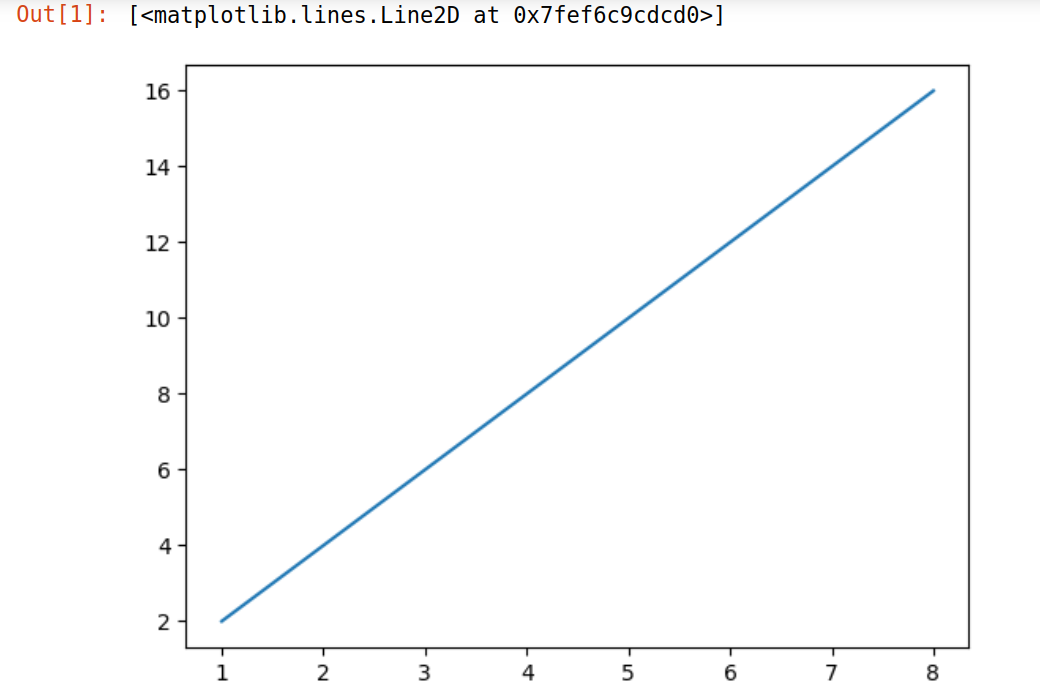
x=[1,2,3,4,5,6,7,8]
y=[2,4,6,8,10,12,14,16]
plt.plot(x,y)
添加水平/垂直线
matplotlib,mat:矩阵,plot:制图,lib:库
import numpy as np
import matplotlib.pyplot as plt
x=np.random.uniform(1,10,10)
y = x*2
plt.plot(x,y)
plt.axhline(y=10,ls="-.",c="#efefef")#添加水平直线
plt.axvline(x=5,ls="-.", c="#ddeedd") #添加垂直直线
# plt.show() # vscode中需要加这一行,jupyter不需要
饼图
import matplotlib.pyplot as plt
# plt.rcParams['font.sans-serif'] = ['SimHei']  # Windows系统
# plt.rcParams['axes.unicode_minus'] = False  # 解决负号显示

# 基础饼图
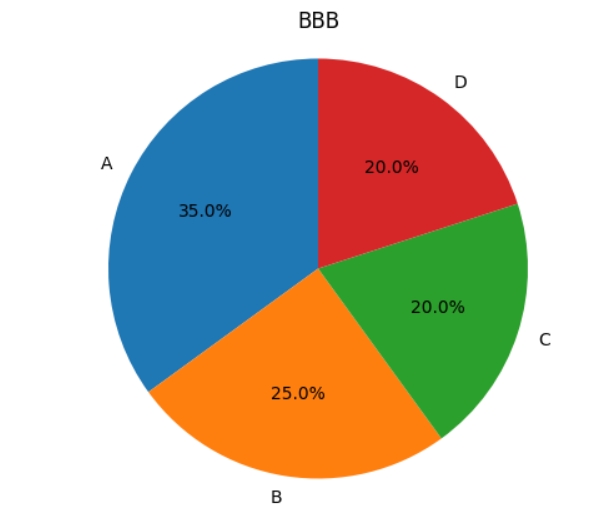
sizes = [35, 25, 20, 20]
labels = ['A', 'B', 'C', 'D']
plt.pie(sizes, labels=labels, autopct='%1.1f%%', startangle=90)
plt.axis('equal')  # 保持正圆形
plt.title('BBB')
plt.show()
|
import matplotlib.pyplot as plt
# 带突出效果的饼图
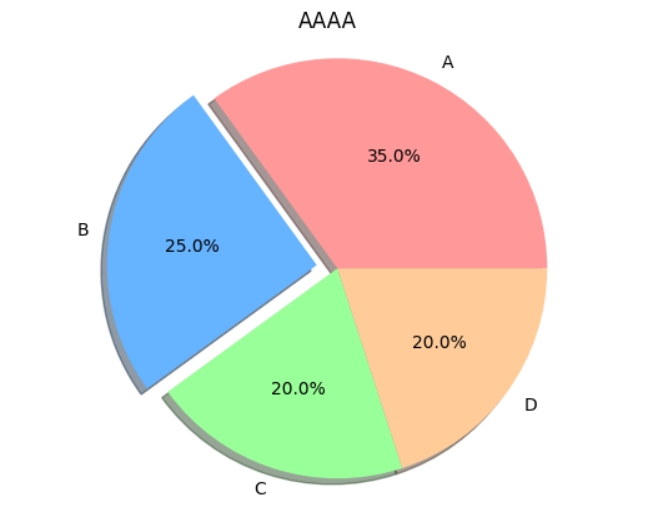
explode = (0, 0.1, 0, 0)
plt.pie(sizes, explode=explode, labels=labels,
        autopct='%1.1f%%', shadow=True,
        colors=['#ff9999','#66b3ff','#99ff99','#ffcc99'])
plt.axis('equal')
plt.title('AAAA')
plt.show()
|
import matplotlib.pyplot as plt
# 嵌套饼图(双层结构)
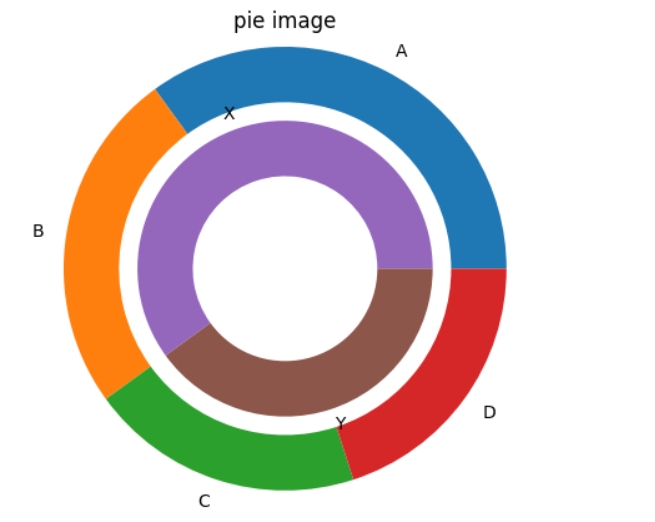
inner_sizes = [60, 40]
inner_labels = ['X', 'Y']
fig, ax = plt.subplots()
ax.pie(sizes, labels=labels, radius=1.2,
        wedgeprops=dict(width=0.3))
ax.pie(inner_sizes, labels=inner_labels, radius=0.8,
        wedgeprops=dict(width=0.3))
plt.title('pie image')
plt.show()
|
|
|
|
|
tree·二叉树
import networkx as nx
import matplotlib.pyplot as plt

def hierarchy_pos(G, root, width=1., vert_gap=0.2, vert_loc=0, xcenter=0.5):
    pos = {root: (xcenter, vert_loc)}
    neighbors = list(G.successors(root))
    if len(neighbors) != 0:
        dx = width / len(neighbors)
        nextx = xcenter - width/2 - dx/2
        for neighbor in neighbors:
            nextx += dx
            pos.update(hierarchy_pos(
                G, neighbor, width=dx, vert_gap=vert_gap,
                vert_loc=vert_loc-vert_gap, xcenter=nextx))
    return pos

# 示例:强制树形结构(每个节点仅一个父节点)
edges = [
    ('Alice', 'Bob'),
    ('Alice', 'Charlie'),
    ('Charlie', 'David'),
    ('Charlie', 'Eve')
]
G = nx.DiGraph()
G.add_edges_from(edges)

# 计算递归布局坐标
pos = hierarchy_pos(G, 'Alice')

# 绘制图形
plt.figure(figsize=(10, 8))
nx.draw(G, pos, with_labels=True, node_size=2000, node_color='lightgreen',
        arrows=True, font_weight='bold', font_size=12)
plt.title("Custom Recursive Tree Layout")
plt.show()
# 保存矢量图格式(SVG)
plt.savefig('output.svg', format='svg', bbox_inches='tight')

# 保存高分辨率位图(PNG)
plt.savefig('output.png', dpi=300, transparent=True, bbox_inches='tight')
关键参数说明: format:指定输出格式(支持 svg/png/jpg/pdf 等) dpi:设置分辨率,推荐 300 以上用于印刷 transparent:保留图像透明通道 bbox_inches='tight':自动裁剪空白边缘 若需批量生成不同格式文件,可连续调用savefig方法。 注意文件路径需使用合法字符,避免特殊符号。 保存路径默认为当前工作目录,建议使用绝对路径指定特定存储位置。 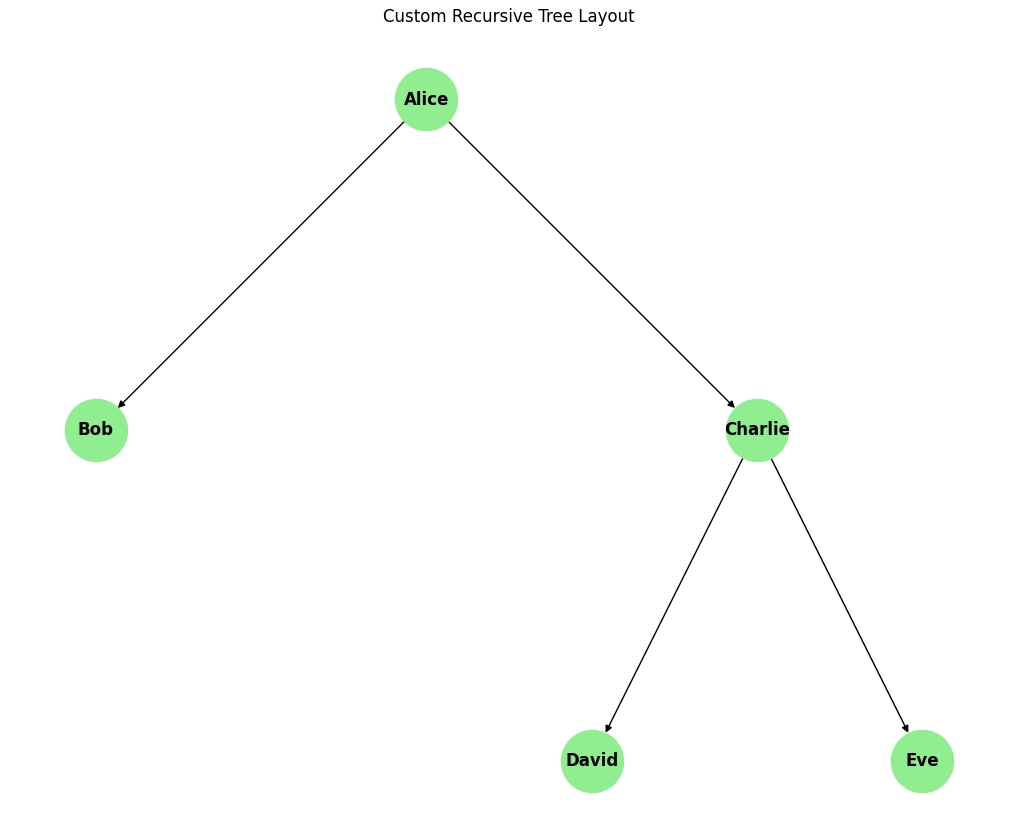
|
注意事项:
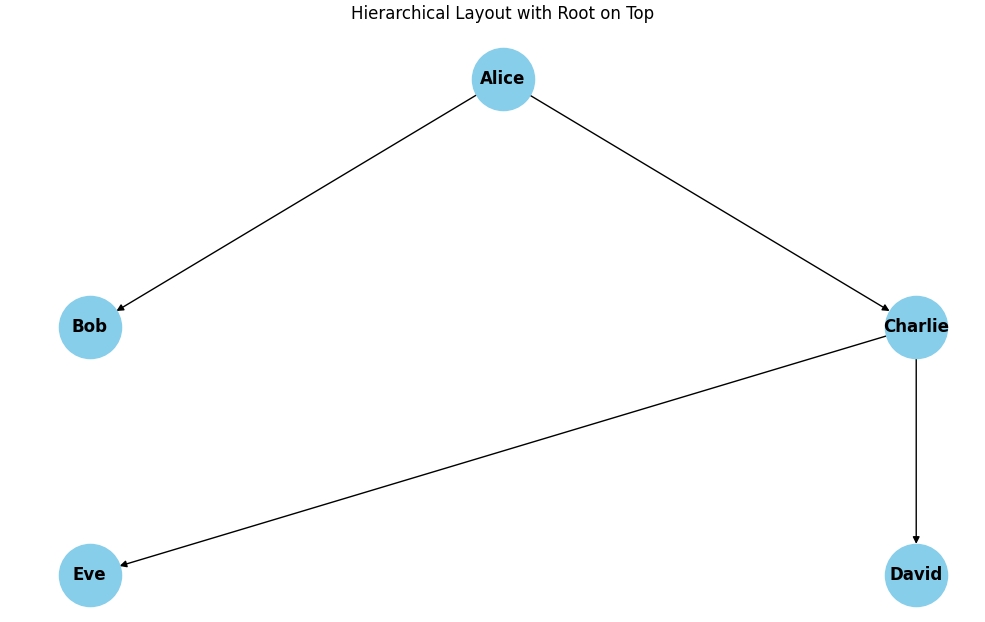
1. 有向无环图(DAG)
nx.topological_sort()要求图必须为有向无环图(DAG)
网络数据中不能存在类似(如Alice→Bob→Alice形成的循环)的环状结构
import networkx as nx
import matplotlib.pyplot as plt

edges = [('Alice', 'Bob'), ('Alice', 'Charlie'), ('Charlie', 'David'), ('Charlie', 'Eve')]
G = nx.DiGraph()
G.add_edges_from(edges)

# 定义层级并添加节点属性
layers = {0: ['Alice'], 1: ['Bob', 'Charlie'], 2: ['David', 'Eve']}
for layer, nodes in layers.items():
    for node in nodes:
        G.nodes[node]['layer'] = layer

# 生成布局并翻转Y轴
pos = nx.multipartite_layout(G, subset_key='layer', align='horizontal')
for node in pos:
    pos[node][1] *= -1  # 反转Y坐标

# 绘制图形
plt.figure(figsize=(10, 6))
nx.draw(G, pos, with_labels=True, node_size=2000, node_color='skyblue',
        arrows=True, font_size=12, font_weight='bold')
plt.title("Hierarchical Layout with Root on Top")
plt.show()
|
|
|
|
|
|
|
|
字体乱码
首先安装常用的中文字体包:

# 安装文泉驿字体(推荐)
sudo apt install fonts-wqy-zenhei

# 也可以安装其他中文字体
sudo apt install fonts-wqy-microhei
sudo apt install ttf-wqy-zenhei
清除 Matplotlib 字体缓存
rm -rf ~/.cache/matplotlib
修改 Python 代码使用已安装的字体
import matplotlib.pyplot as plt
import networkx as nx

# 设置支持中文的字体 - 使用文泉驿正黑
plt.rcParams['font.sans-serif'] = ['WenQuanYi Zen Hei']  # 文泉驿正黑
# 或者使用微米黑
# plt.rcParams['font.sans-serif'] = ['WenQuanYi Micro Hei']
plt.rcParams['axes.unicode_minus'] = False  # 解决负号显示问题

# 创建社交网络
social_network = nx.Graph()
social_network.add_edges_from([
    ("张三", "李四"), ("张三", "王五"), ("李四", "王五"),  # 使用中文节点名测试
    ("王五", "赵六"), ("赵六", "钱七"), ("钱七", "孙八"),
    ("孙八", "周九"), ("周九", "赵六"), ("张三", "孙八"),
    ("李四", "钱七"), ("王五", "周九")
])

# 计算介数中心性
betweenness = nx.betweenness_centrality(social_network)
key_person = max(betweenness.items(), key=lambda x: x[1])[0]

# 可视化
plt.figure(figsize=(10, 8))
pos = nx.spring_layout(social_network, seed=42)
nx.draw_networkx_nodes(social_network, pos, node_size=700)
nx.draw_networkx_edges(social_network, pos, width=1.5)
nx.draw_networkx_labels(social_network, pos, font_size=12)

# 突出显示关键人物
nx.draw_networkx_nodes(social_network, pos, nodelist=[key_person], node_color="r", node_size=800)
plt.title("社交网络分析")
plt.axis("off")
plt.show()
替代方案:使用 Noto 字体
如果文泉驿字体效果不理想,可以安装 Google 的 Noto 字体:

# 安装 Noto Sans CJK 字体(包含简体中文)
sudo apt install fonts-noto-cjk
plt.rcParams['font.sans-serif'] = ['Noto Sans CJK SC'] # 简体中文
验证字体是否安装成功
from matplotlib.font_manager import fontManager
import matplotlib.pyplot as plt

# 列出所有包含 'Hei' 或 'Noto' 的字体
fonts = [f.name for f in fontManager.ttflist if 'Hei' in f.name or 'Noto' in f.name or 'Wen' in f.name]
print("可用中文字体:", fonts)

# 测试中文显示
plt.figure()
plt.text(0.5, 0.5, "中文测试: 社交网络分析", fontsize=20, ha='center')
plt.axis('off')
plt.show()
|
|
|
|
|
|
|
|
数据分布图·seaborn
|
### 环境准备与中文字体
```python
import pandas as pd
import numpy as np
import matplotlib.pyplot as plt
import seaborn as sns
# 图表样式
plt.style.use('seaborn-v0_8')
sns.set_palette("bright")
# 中文字体,保证图表中文正常显示
plt.rcParams['font.sans-serif'] = ['SimHei', 'Arial Unicode MS', 'DejaVu Sans']
plt.rcParams['axes.unicode_minus'] = False
```
### matplotlib vs seaborn 对比(直方图 + 箱线图)
- **直方图**:看单个连续变量的分布形状——数据落在哪些区间、是否偏态
- **箱线图**:五数概括(中位数/四分位/须)+ 异常值,一眼看清离群点
```python
fig, axes = plt.subplots(2, 2, figsize=(15, 10))
fig.suptitle('Matplotlib vs Seaborn 对比展示', fontsize=16, fontweight='bold')
# matplotlib 版直方图
axes[0,0].hist(demo_df['评分'], bins=20, alpha=0.7, color='blue')
axes[0,0].set_title('Matplotlib 直方图')
# seaborn 版直方图(更美观,自动拟合密度)
sns.histplot(data=demo_df, x='评分', bins=20, ax=axes[0,1])
axes[0,1].set_title('Seaborn 直方图')
# matplotlib 版箱线图:需手工按类别取数
genres = demo_df['电影类型'].dropna().unique()
box_data = [demo_df.loc[demo_df['电影类型'] == genre, '评分'].dropna().values
for genre in genres]
# 过滤空数组,避免绘图异常
genres = [g for g, d in zip(genres, box_data) if len(d) > 0]
box_data = [d for d in box_data if len(d) > 0]
# matplotlib 3.9 起 labels 改名 tick_labels,需兼容
try:
axes[1,0].boxplot(box_data, tick_labels=genres)
except TypeError:
axes[1,0].boxplot(box_data, labels=genres)
axes[1,0].set_title('Matplotlib 箱线图')
# seaborn 版箱线图:一行代码,自动处理分类
sns.boxplot(data=demo_df, x='电影类型', y='评分', hue='电影类型',
palette='pastel', legend=False, ax=axes[1,1])
axes[1,1].set_title('Seaborn 箱线图(一行代码!)')
plt.tight_layout()
plt.show()
```
> 对比总结:Matplotlib 功能强大但代码多;Seaborn 简洁美观、自动处理分类数据。
|
|
### seaborn 的四种特色图
| 图表 | 作用 |
|------|------|
| 散点图 `sns.scatterplot` | 发现两个变量之间的关系,hue 可加第三维(类别着色) |
| 小提琴图 `sns.violinplot` | 比箱线图更详细地显示数据分布(密度形状) |
| 计数图 `sns.countplot` | 统计各类别数量,柱状图的智能升级版 |
| 热力图 `sns.heatmap` | 可视化相关性,颜色越深关系越强 |
```python
fig, axes = plt.subplots(2, 2, figsize=(15, 10))
fig.suptitle('Seaborn 特色功能展示', fontsize=16, fontweight='bold')
# 1. 散点图 + 类别着色
sns.scatterplot(data=demo_df, x='票房', y='评分', hue='电影类型',
palette='pastel', ax=axes[0,0])
axes[0,0].set_title('散点图:票房 vs 评分')
# 2. 小提琴图(显示分布形状)
sns.violinplot(data=demo_df, x='电影类型', y='评分', hue='电影类型',
palette='pastel', legend=False, ax=axes[0,1])
axes[0,1].set_title('小提琴图:评分分布')
axes[0,1].tick_params(axis='x', rotation=45)
# 3. 计数图
sns.countplot(data=demo_df, x='电影类型', hue='电影类型',
palette='pastel', legend=False, ax=axes[1,0])
axes[1,0].set_title('计数图:各类型电影数量')
# 4. 热力图(相关性矩阵)
corr_data = demo_df[['评分', '票房']].corr()
sns.heatmap(corr_data, annot=True, cmap='coolwarm', center=0,
square=True, ax=axes[1,1])
axes[1,1].set_title('热力图:相关性分析')
plt.tight_layout()
plt.show()
```
|
|
### 小提琴图精讲(教学重点)
**是什么**:小提琴图 = 箱线图的升级版。琴身由**两侧对称的核密度估计(KDE)曲线**围成:
- **琴身越宽** → 该数值区间的样本越多
- **琴身越窄** → 该区间样本越稀少
- **双峰/多峰** → 琴身出现"蜂腰",分布有两个集中区
**为什么比箱线图强**:箱线图只给五数概括,**看不出双峰分布**;小提琴图保留完整密度形状,双峰、偏态一目了然。
```python
sns.violinplot(data=demo_df, x='电影类型', y='评分', hue='电影类型',
palette='pastel', legend=False, ax=axes[0,1])
```
**叠加箱线信息**:`inner` 参数可把统计量嵌进琴身,两者兼得:
```python
sns.violinplot(data=demo_df, x='电影类型', y='评分',
inner='box') # 内嵌迷你箱线图
# inner='quartile' 画四分位线;inner='stick' 画每个样本点
```
**记忆口诀**:
> 琴宽人多家扎堆,琴瘦人少分布稀;
> 双峰箱线看不见,小提琴一拉就现形。
**选型建议**:
- 快速看异常值 → 箱线图
- 看分布形状(是否双峰/偏态)→ 小提琴图
- 既要统计量又要形状 → `violinplot(inner='box')`
|
|
### 饼图(类别占比,适合 ≤6 类)
```python
type_counts = demo_df['电影类型'].value_counts()
plt.figure(figsize=(10, 8))
colors = sns.color_palette('husl', n_colors=len(type_counts))
wedges, texts, autotexts = plt.pie(
type_counts.values,
labels=type_counts.index,
autopct='%1.1f%%', # 自动标注百分比
colors=colors,
startangle=90,
explode=[0.02] * len(type_counts), # 每块轻微分离
textprops={'fontsize': 11}
)
for autotext in autotexts: # 百分比文字白色加粗
autotext.set_color('white')
autotext.set_fontweight('bold')
plt.title('不同类型电影数量分布', fontsize=14, fontweight='bold')
plt.axis('equal') # 正圆
plt.tight_layout()
plt.show()
```
### 回归图(散点 + 拟合线 + 置信带)
```python
sns.regplot(data=demo_df, x='评分', y='票房',
scatter_kws={'alpha': 0.6})
plt.title('电影评分与票房关系')
plt.show()
```
> 一行代码即可看出两变量的线性趋势,阴影为回归置信区间。
|
|
### 网络结构图(networkx)
节点 = 实体(电影/演员/导演),边 = 关系。适合展示共现、关联关系(NLP 中常用于高频词共现网络)。
```python
# pip install networkx
import networkx as nx
import matplotlib.pyplot as plt
G = nx.Graph()
G.add_edge('电影A', '演员1')
G.add_edge('电影A', '导演1')
G.add_edge('电影B', '演员1')
nx.draw(G, with_labels=True)
plt.show()
```
> 交互式版本可 `pip install pyvis`,网页中可拖拽节点。
|
参考